Digital signage for this event runs on freestanding LED posters placed around the convention hall — tall, narrow, bright, and read by people walking past at arm's length or from across a hallway. They are not TVs turned sideways and they are not a big LED wall in miniature; they have their own rules. This guide gives you the exact pixel dimensions, the file formats the posters' onboard players accept, and — most importantly — what actually reads on a 20-inch-wide screen and what doesn't.
You create the content; AV Factory loads it onto the posters and runs it. Following these guidelines means your artwork goes up exactly as you designed it, with no last-minute resizing, re-encoding, or "can you make the text bigger?" phone calls. If anything here raises a question, please reach out early: tbaldini@avfactory.com
| Destination | Resolution (W×H) | Aspect | Physical Size | Content Sources |
|---|---|---|---|---|
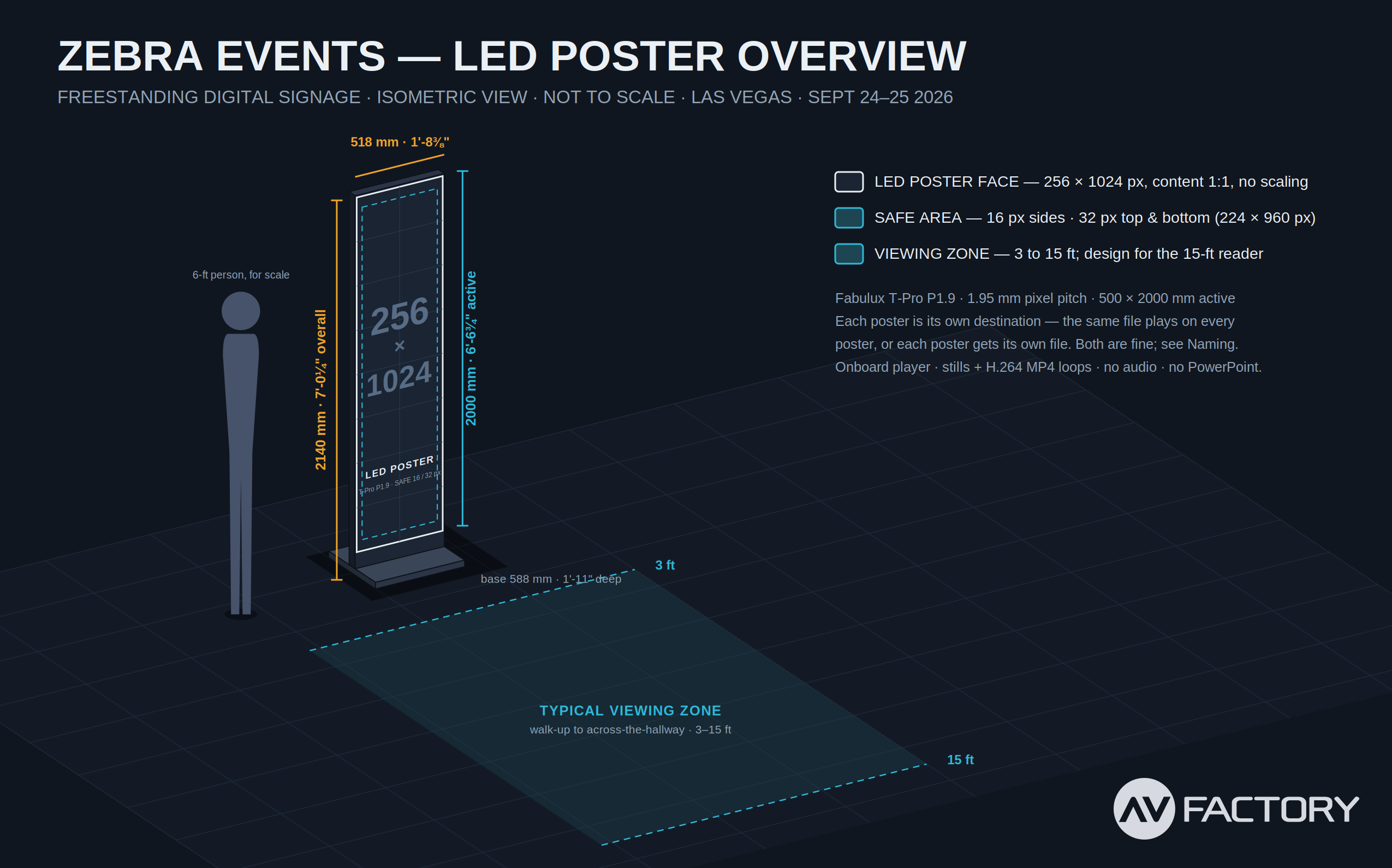
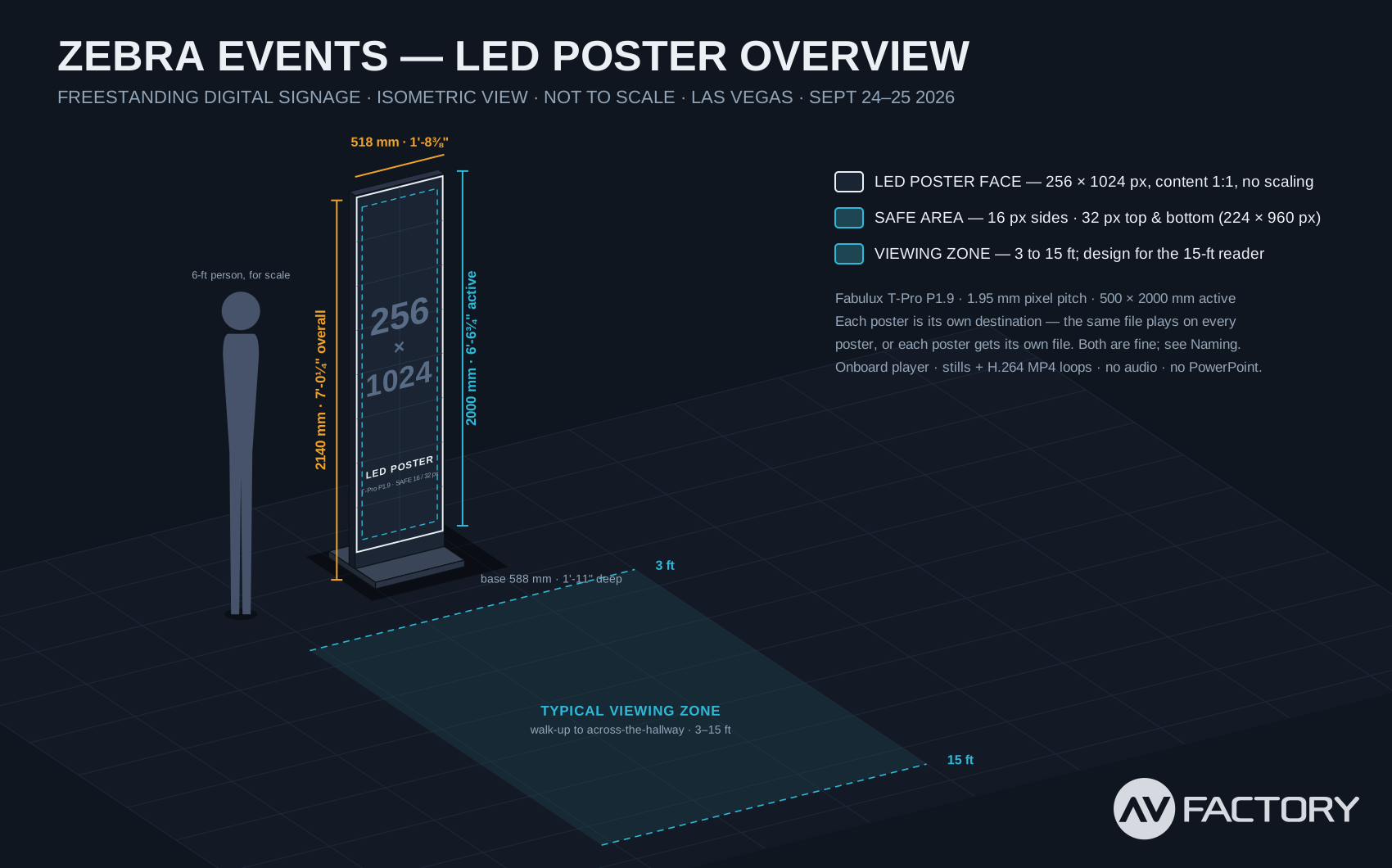
| LED Poster (each) | 256 × 1024 (portrait) | 1:4 | 500 × 2000 mm active (19.7" × 78.7") · 7'-0" tall overall | Onboard player — still images (PNG/JPG) and H.264 video loops (MP4) |
Each poster is a Fabulux T-Pro P1.9 (1.95 mm pixel pitch), 256 pixels wide by 1024 tall, playing from its own built-in media player. There are no live inputs, no slide computer, and no speakers — the posters simply cycle through the stills and loops we load onto them. One file can play on every poster, or each poster can carry its own content. You don't need to think about the hardware; just hit the pixel count above and we'll do the rest.
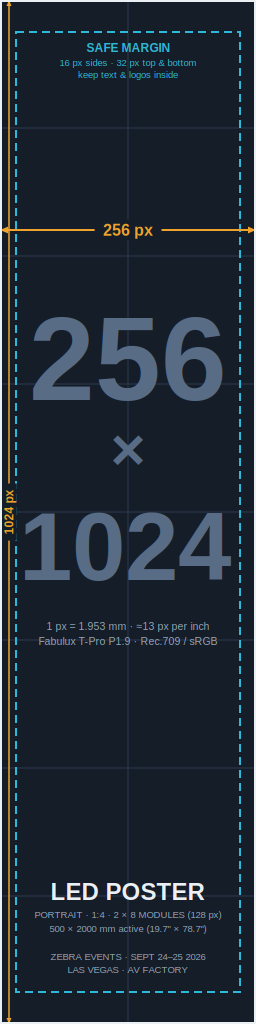
The poster's active screen is 2 modules wide × 8 modules tall, each module 128 × 128 px (250 mm square), giving 256 × 1024 px at 1.95 mm pixel pitch. That works out to 1 px ≈ 1.95 mm, or about 13 px per inch — a useful number to keep in your head: a 26-px-tall capital letter is 2 inches tall on the poster; a 130-px logo is 10 inches wide.
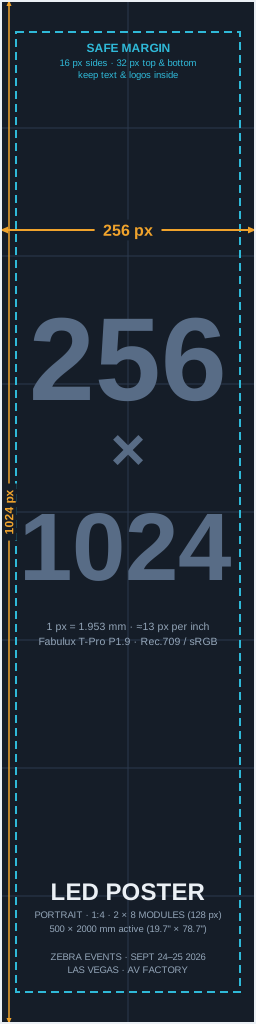
The pixel map is available as a full-resolution PNG (drop into your Photoshop / After Effects project as an underlay and design on top of it) or as an editable vector SVG. It is exactly 256 × 1024 — if your document matches it edge for edge, your document is the right size.
⬇ Download all maps (PNG + SVG, .zip)
The following template files are delivered alongside this document:
| Edge | Margin | On the poster | Why |
|---|---|---|---|
| Left & right | 16 px | ≈ 1¼" | The cabinet frame sits right at the edge of the pixels, and people view these from off-axis as they walk by. Anything that must be read lives inside the dashed line; backgrounds, washes and photography still run full bleed to the edge. |
| Top & bottom | 32 px | ≈ 2½" | |
| Safe area | 224 × 960 px | 17¼" × 73¾" | The box your design really has to work in. |
The poster is tall, narrow, and bright, and its audience is moving. Nobody stands still and reads a poster; they glance at it from 3 to 15 feet while walking to somewhere else. That single fact drives every recommendation below: one idea per poster, big enough to catch at a glance, dark enough not to glare. Content designed like a web page or a slide will look busy and unreadable. Content designed like a street poster will look fantastic.
| Element | Absolute minimum | Recommended | Real-world size on poster |
|---|---|---|---|
| Must-read text (times, rooms, calls to action) | 34 px font · 24 px cap height | 48–72 px font | 2" / 2¾–4" tall letters |
| Headline / hero word | 72 px | 100–160 px | 5½" / 7¾–12" tall |
| Supporting text (a subtitle, a sponsor line) | 34 px | 40 px | 2¾" / 3" |
| Line / stroke weight | 3 px | 6 px + | ¼" / ½"+ thick |
| Logo width (mark) | 120 px | 160–224 px | 9" / 12–17" wide |
| Icon / arrow | 80 px | 120 px + | 6" / 9"+ |
Rule of thumb behind the numbers: comfortable reading needs roughly 1 inch of letter height for every 10 feet of distance. Your farthest reader is 15 feet away, so 1½"–2" letters (about 24–26 px cap height, i.e. a 34–36 px font) are the floor. Anything smaller is decoration, not information.
At the recommended 48–72 px, a bold sans-serif fits roughly 5–8 characters per line inside the safe area. Design for that: "REGISTRATION" doesn't fit at 48 px; "REG" or "CHECK-IN" does. Stack words vertically instead of shrinking them, and let one idea occupy the whole poster — a schedule of six sessions is six posters (or a six-slide still rotation), not one crowded one.
Because playback comes from each poster's built-in player rather than a media server, the spec is deliberately simple: a standard, well-encoded H.264 .mp4 at exactly 256 × 1024. No ProRes, no HAP, no 4K masters — just the file the player wants, and nothing else.
| Container | .mp4 |
| Codec | H.264 (AVC), High profile, 8-bit 4:2:0 required |
| Resolution | 256 × 1024, portrait — no letterboxing, no scaling, no rotation metadata |
| Frame rate | 30 fps progressive, constant preferred · 60 fps accepted Do not render 23.98/24 or 29.97/59.94 — the players run a flat 30/60 Hz clock, and fractional rates cause a visible skipped frame every 30-odd seconds. |
| Bitrate | 6 Mbps VBR (2-pass) target for most loops; 3–4 Mbps is still excellent at this small raster. Max 8 Mbps. |
| Keyframes | Every 1–2 seconds (30–60 frames); no open GOPs |
| Color | Rec.709, video (legal) levels |
| Audio | None — strip the audio track entirely. The posters have no speakers, and a silent track is wasted bytes against your file-size cap. |
| Loops | Seamless first-to-last frame; put _LOOP in the filename |
| Max file size | 100 MB per file |
| Max loop length | 4:00 per file |
| Sweet spot | 30 s – 2 min loops. Signage audiences are transient; nobody watches minute three. |
Those two caps meet in the middle: at the 4-minute maximum you have to encode at about 3.3 Mbps to stay under 100 MB — which is still more than three times the bits-per-pixel of a typical 1080p web stream, so it looks great for graphic content. Rough guide:
| Loop length | Bitrate | ≈ File size |
|---|---|---|
| 0:30 | 8 Mbps | 30 MB |
| 1:00 | 8 Mbps | 60 MB |
| 2:00 | 6 Mbps | 90 MB |
| 4:00 | 3.3 Mbps | 100 MB |
The poster's player is a compact signage device, not a GPU media server — it decodes H.264 in hardware and stalls on anything heavier. At 256 × 1024 the file is tiny anyway; there is nothing to gain from a 2 GB ProRes render except a slower upload. Export straight from your editor and skip the middle step.
The number-one failure is a file that is almost 256 × 1024 — a 1080 × 1920 phone-vertical render, a 270 × 1080 crop, a landscape file with a rotation flag. Set the timeline size explicitly, at the start:
Adobe Premiere Pro
File → New → Sequence → Settings tab → Editing Mode: Custom →
Timebase 30.00 fps → Frame Size 256 horizontal × 1024 vertical → Pixel Aspect Ratio
Square Pixels. Export: H.264, Match Source, VBR 2-pass, target 6 Mbps, audio off.
Adobe: create a custom sequence preset
DaVinci Resolve
Project Settings (gear) → Master Settings → Timeline Format → Timeline Resolution
Custom → 256 × 1024 → Timeline Frame Rate 30. Deliver page: MP4 / H.264, restrict bitrate to
6,000 kb/s, uncheck Export Audio.
Blackmagic: DaVinci Resolve support & reference manual
Final Cut Pro
File → New → Project → Use Custom Settings → Video Format Custom →
Resolution 256 × 1024 → Rate 30p. Share → Export File → Computer / H.264 (Better Quality), audio none.
Apple: create a new project in Final Cut Pro
After Effects / Photoshop / Illustrator / Figma
New comp or document at 256 × 1024 px,
square pixels, 30 fps, sRGB. Drop the pixel-map PNG in as a bottom layer, lock it, and design on top. Export
stills as PNG at 100% — never "Save for Web" at a scaled size.
Tip: view your design at 100% zoom on a monitor, then step back 15 feet. If you can't read it there, neither can the audience.
| Resolution | 256 × 1024 px exactly, portrait |
| Format | .png (preferred) · .jpg at quality 90+ is fine for photography |
| Color | sRGB, 8-bit; no embedded CMYK or printer profiles; no transparency (it renders black) |
| Safe margin | 16 px sides · 32 px top & bottom |
| Dwell time | Stills rotate at 10 seconds each unless you tell us otherwise. Send a playlist order with your delivery (see Delivery). |
| Not accepted | PDF, PowerPoint/Keynote files, animated GIF, TIFF, PSD — export a PNG |
| Vector (preferred) | .svg, .ai, or .eps |
| Raster | .png with transparency, 24-bit, largest size available |
| Brand kit | Send your brand guide (colors, clear-space, don'ts) so anything we build on site stays on-brand |
Stills and loops can be mixed freely in a poster's playlist — a 10-second still sponsor card between two 45-second loops is a very normal signage rotation.
| Naming pattern | ZebraEvents_[Content]_[PosterTag]_v[#].[ext] e.g. ZebraEvents_Welcome_LOOP_AllPosters_v2.mp4 · ZebraEvents_Wayfinding_Poster03_v1.png |
| Poster tags | AllPosters — the file plays on every poster · Poster01, Poster02 … — the file plays on one specific poster. If you're doing per-location content, include a one-page placement list with your delivery (which tag goes where — "Poster01 = main entrance, Poster02 = registration") so we hang the right content in the right spot. |
| Playlist order | A simple text list per poster tag: file name, and dwell time for stills (default 10 s). We build the rotation exactly as listed. |
| Versioning | Increment v1 → v2 → v3 with every change. Please never use "FINAL", "FINAL2", or "FINALfinal" — we've all been there, and it never ends well. |
| Deadline | All poster content due one week before the event — Thursday, September 17, 2026. Anything after that lands in the on-site change queue and is handled as time allows. |
| Delivery | WeTransfer to tbaldini@avfactory.com, or a shared drive folder link — either is fine; at these file sizes a hard drive is overkill. No email attachments over 20 MB, please. |